# A Guide to React Context 💫
### **What is React Context 🤔?**
The **React Context** provides a way to pass data through the component tree without having to pass `props` down manually to every level. In React, data is often passed from a parent to its child component as a property.
> Context is like a global object to the React component sub-tree 🌐.
### **What problems does Context solve 😟?**
- In React applications let parent components pass data long to children components but issues arise when that data is meant to be used by children components multiple layers deep but not by immediate children of that parent component.
Let's look at the below diagram 📈.
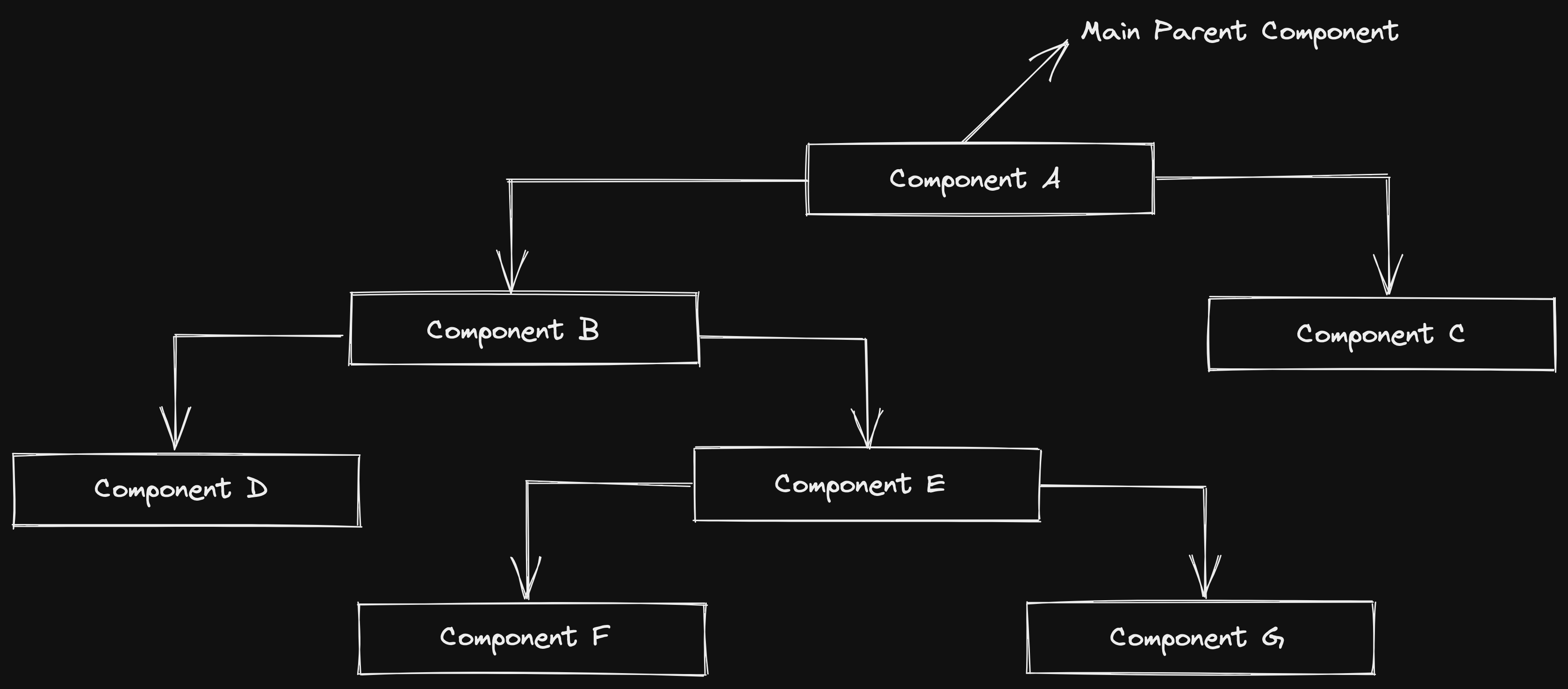
`Component A` is clearly the main parent component with immediate children components B, C. These components can receive params from `component A` and pass that data to the children components, but what about a scenario where `Component E` needs data from `Component A` and that data is not needed in `Component B` then passing that data to `Component B` becomes _redundant_.
> **_Props drilling_**, a term to describe when you pass props down multiple levels to a nested component, through components that don't need it.
This is the _benefit_ of React context - it provides a cool way 😎 of making data readily available to every single child component in the React Application.
### **How do we use Context 😕?**
As far we get to know that React context allows us to _pass down_ and use (_consume_) data in whatever component we need in our React app without using `props`.
**Using the new React Context API depends on `four` main steps:**
🔸 Create Context using the `createContext` method. This function then returns an object with a **Provider** and a **Consumer**.
```javascript
import React from 'react';
const AuthContext = React.createContext();
```
🔸 Next, use the _Provider component_ to wrap around the parent/main component.
🔸 Wrap child components in the _Provider component_ and make it accept a prop called `value`. This `value` can be anything!
```javascript
```
🔸 Use the _Consumer component_ anywhere below the Provider in the component tree to get a _subset_ of the state.
```javascript
function Demo() {
return (
{value => {value}
}
);
}
```
📌 **Let's see the full example:**
```javascript
import React from 'react';
export const AuthContext = React.createContext();
export default function App() {
return (
)
}
function Demo() {
return (
{value => {value}
} /* prints happy */
);
}
```
Above our **App component**, we are creating context with `React.createContext()` and putting the result in a variable, `AuthContext`.
- In almost every case, you will want to export it as we are doing here because your component will be in another file.
> Note that we can pass an initial value to our value prop when we call React.createContext().
- The created context is an object with two properties: `Provider` and `Consumer`, both of which are components.
> **Things to keep note down what Provider actually do ✍️:**
> ➡️ It holds **one single javascript** value that can be anything: an array, a function or an object.
> ➡️ It won’t cause its **children to re-render**: The context’s provider’s direct children won’t re-render every time the provider renders, but the consumers will.
This rule is only valid for re-renders caused by the provider internally _(state)_, but if his parent re-renders (props), the provider’s children will re-render as well.
> ➡️ **All subscribers** will re-render when the context value changes.
- In our _App component_, we are using AuthContext. Specifically `AuthContext.Provider`, To pass our `value` down to every component in our App, we wrap our _Provider component_ around it and in this case, `Demo`.
- On `AuthContext.Provider`, we put the value that we want to pass down our entire component tree. We set that equal to the `value` prop to do so. (here, **Happy**).
- In `Demo`, or wherever we want to consume what was provided in our context, we use the _consumer component_: `AuthContext.Consumer` To use our passed-down value, we use what is called the **render props pattern**.
It is just a function that the _consumer component_ gives us as a `prop`. And in return for that function, we can return and use that `value`.
#### Another way of consuming context with the **useContext hook**.
📌 Here is the same example using **useContext**:
```javascript
import React from 'react';
export const AuthContext = React.createContext();
export default function App() {
return (
)
}
function Demo() {
const value = React.useContext(AuthContext);
return {value}
;
}
```
> **useContext** accepts the context type as parameter and returns the context value of the nearest provider of that type. If there is no such provider, then the default context value will be returned.
### **Will app’s performance get impacted 💥?**
🔹 In short, you app’s performance will decrease _drastically_ if your provider does a lot of work, for example having a value that combines a lot of separate values, you will have a lot of consumers of the same provider, and they will all re-render.
🔹 When the provider’s wrapper re-renders due to an internal cause (may be state), its children won’t re-render, only a consumer will. It is like your provider’s value teleports from the provider to the consumers directly ignoring everything in between.
🔹 So, it is more than okay to have multiple contexts and providers.
### **What differs Redux from context API ?**
As you can see, the concepts involved are actually not that different from **Redux**.
So **does context replaces redux?**
The answer is **NO**🙅.
Redux isn’t only a way to pass down props( teleports them), it allows _persistence_, supports _middlewares_, and has a lot more advantages.
My recommendation is to use _Redux_ for complex global state management and _Context_ for prop drilling.
As this article isn’t meant to talk about redux, so, I will drop some useful resources to read more about this comparison 👇.
- Answer on [StackOverflow](https://stackoverflow.com/a/49569183/7104283).
- Dan’s post about [You Might Not Need Redux](https://medium.com/@dan_abramov/you-might-not-need-redux-be46360cf367****).
---
In this article, we explored how we can easily use React Context instead of passing down props to share data between components 🚢.
Depending on your use case, you might prefer to use simple **props**, **React Context** or even a third-party library like **Redux** to share data between your components.
%[1483511651890778112]
Keep coding 😉. Thank you for reading 💖.
Feel free to connect on [Twitter](https://twitter.com/Adyasha8105) :)